
4 053 läst ·
25 svar
4k läst
25 svar
IMAP configuration for Telia


@Andy78, the Dutch account is provided bij a Dutch company but on the same computer
@Tomsom, I have the same configuration as you have in both pictures.
I can try to reconfigure it with the automatic software, I let it know.
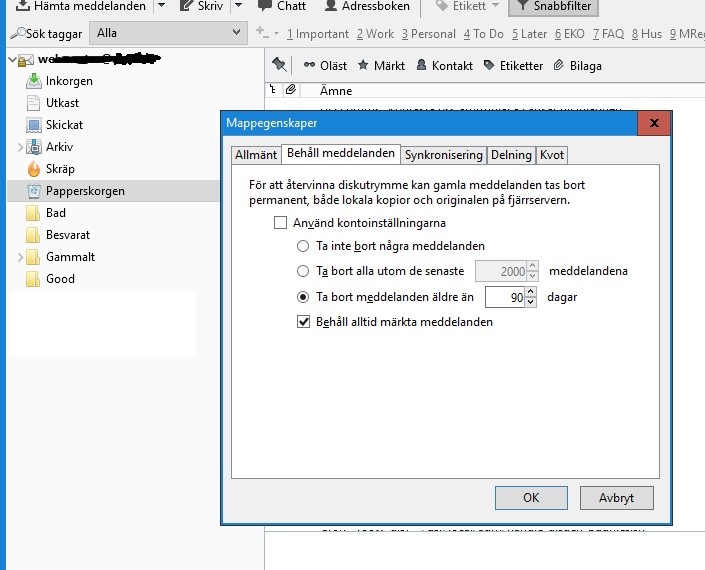
@Svartöra, I can try this but do I understand that all mails will be removed automatacly after 90 days (as in your picture) ? And does it also remove (empty) the papperskorger ?
That could be a solution, I only have to mark the mails which I want to keep longer.
@Furulunsman, ja jag vill skriva Svenska men min Svenska är inte så bra. Du forstå inte mycke från min Svenska
@Tomsom, I have the same configuration as you have in both pictures.
I can try to reconfigure it with the automatic software, I let it know.
@Svartöra, I can try this but do I understand that all mails will be removed automatacly after 90 days (as in your picture) ? And does it also remove (empty) the papperskorger ?
That could be a solution, I only have to mark the mails which I want to keep longer.
@Furulunsman, ja jag vill skriva Svenska men min Svenska är inte så bra. Du forstå inte mycke från min Svenska
The settings are per folder so all other folders would keep the emails forever but the emails in the trashcan would be removed after 90 days.Nol skrev:
There are also settings in the Account menu but they apply to all folders. If you instead right-click on a certain folder you can change the settings for that folder only.


I suggest you wait a week or so. The "delete" command in IMAP does not mean "delete immediately" but rather "mark for delete and remove at some later time".
So when you delete a message in Thunderbird it is moved to the Prullenbak where it sits around for the time you have set, as described above. After that time, Thunderbird deletes it which means it is marked for delete on the server, but not immediately removed. At some later time it is actually deleted from the server.
I don't have an account at Telia but I do have several accounts on email servers running Dovecot, a free imap server software. On one of these I can see that Thunderbird has moved the messages I have deleted to the Trash folder which is set (in Thunderbird) to keep the messages for 90 days. Right now the oldest message in Trash is from October 20. But I can also see that on the server there are a number of messages in Trash that are older than that. All of them are marked for delete and none of them are older than October 16.
So in this case the messages are first kept in Trash for the 90 days I have set in Thunderbird. Then they are kept for another 4-5 days on the server, and after that, they are finally removed.
So when you delete a message in Thunderbird it is moved to the Prullenbak where it sits around for the time you have set, as described above. After that time, Thunderbird deletes it which means it is marked for delete on the server, but not immediately removed. At some later time it is actually deleted from the server.
I don't have an account at Telia but I do have several accounts on email servers running Dovecot, a free imap server software. On one of these I can see that Thunderbird has moved the messages I have deleted to the Trash folder which is set (in Thunderbird) to keep the messages for 90 days. Right now the oldest message in Trash is from October 20. But I can also see that on the server there are a number of messages in Trash that are older than that. All of them are marked for delete and none of them are older than October 16.
So in this case the messages are first kept in Trash for the 90 days I have set in Thunderbird. Then they are kept for another 4-5 days on the server, and after that, they are finally removed.
Klicka här för att svara