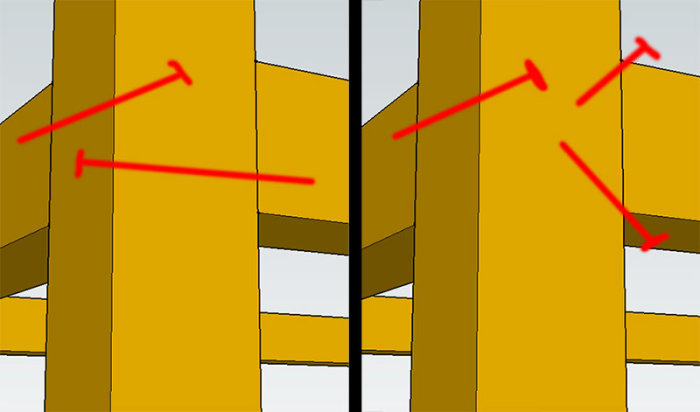
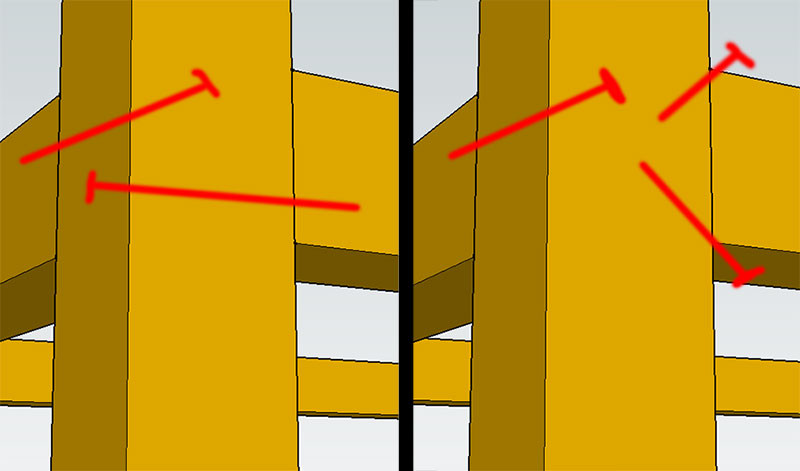
Exactly, double thin instead of 45x45 might also be cheaper. I like the idea. =)
But at the same time, mine had more longitudinal 45x45.. wonder what the difference would be if he also had it..
As I drew the frame in the last picture, it would cost 165 SEK... plus the boards for the shelves then... It's possible to find cheaper wood, but it feels okay, I had a target of 200 SEK per shelf.. =)
Double thin on each side of the posts provides a much larger fastening area, which should make the ladders much more stable. It also allows you to have two attachment points in the ladder for each shelf board, which gives you stability along as well.
Tongue and groove boards as shelves, 22mm if it needs to hold a lot, 17mm if you want to save a bit of money. Posts can be made from 25x50 bärläkt, but this is usually of quite poor quality with a lot of knots. So if you use this, you should examine it carefully. Otherwise, you can use 28x70 glespanel which is often of good quality, and in that case, 45x45 or 45x70 almost costs the same, so you can choose what suits your budget best in combination with what fits well in your shelves.
The shelf is attached to the wall behind or braced with hole bands, cross braces made from battens, or by, for example, screwing a masonite board behind. The board does not need to cover the entire backside.
I'm coming to a question that's embarrassing but still nice to have an answer to.
How should you place the screws when both the long side and the short side should be attached to the gables?
Ideally, you'd want to center both screws, but they collide. 45x45 timber doesn't give much room for maneuver, and I'm afraid the wood will crack. (I plan to pre-drill)
I really don't want to buy loads of brackets even if they cost 8kr each.
Google created a program called Sketchup, which was later sold to another company.
Yes, or actually the other way around.
@last software created a 3D-cad called sketchup, which was sold for quite reasonable money. The last version was 5.
Google bought it, and it was called Google Sketchup. It became free in a light version and is available in a paid version with expanded functionality.
The first version of Google Sketchup thus became (somewhat strangely?) ver 6.
Personally, I like the latest; 8. They've managed to fix the saving time there. So the program doesn't freeze for a moment while it's saving the file. Otherwise, I'm not sure what other features have been added.
Click here to reply
Vi vill skicka notiser för ämnen du bevakar och händelser som berör dig.