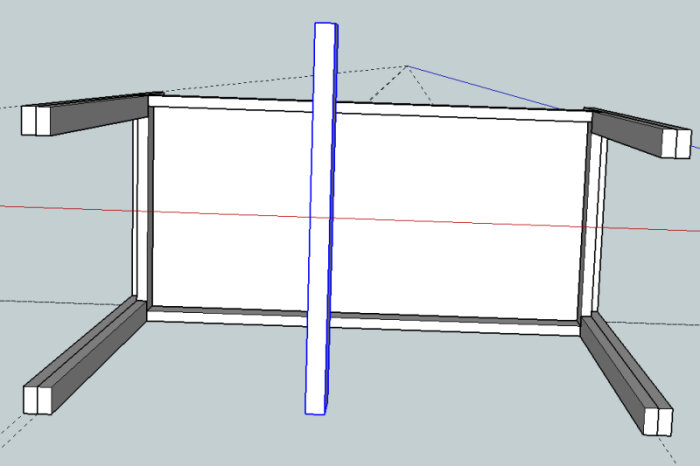
I need a simple free program to draw 3D sketches on the computer before I build a small loft in the children's room. I really want to emphasize that it should be simple. User-friendliness over features. All I need to be able to do is draw a few blocks and then place them in relation to each other in a 3D space (like the one I drew here: http://www.byggahus.se/forum/byggmaterial-byggteknik/226833-oimpregnerade-reglar-95x95-2.html). Does anyone have any tips?
Sketch up.
But simple and just being able to, tends to be very subjective.
I think the program is good for quick sketches. Downloading ready-made models such as beds, toilets, kitchens is also convenient.
I suspected I would get that tip. I have actually downloaded that program, but haven't quite figured it out. What I have managed so far is to draw a rectangular block (a rule), but then I want to be able to move it in the room and place it relative to other things I draw. I can't manage that. Tips are welcome from someone who is better at the program.
I suspected I would get that suggestion. I actually downloaded the program, but haven't quite managed to understand it. What I've managed so far is to draw a rectangular block (a rule), but then I want to be able to move it around the room and place it relative to other things I draw. I haven't succeeded with that. Tips are welcome from anyone who is better with the program.
The easiest way is to make it an object after you've drawn it, otherwise it will continue to be 12 lines. You do this by selecting the entire rectangular block (just draw a box over it), then right-click and press "make component" and then you can move the entire rectangular block with the move tool without it breaking apart or getting stretched.
Thank you! So, on to the next problem... Now I have two objects that I want to place right next to each other. On one hand, they go into each other instead of "bumping" into each other (like normal wooden pieces do, as two separate solid objects cannot occupy the same space in reality). On the other hand, I find it impossible to place them so they are exactly next to each other, so that I know they are in a row in front of each other, so to speak. Very grateful for any help!
Thank you! So on to the next problem... Now I have two objects that I want to place precisely next to each other. Firstly, they overlap instead of "bumping into" each other (like normal wooden pieces do, as two separate solid objects cannot occupy the same space in reality). Secondly, I find it impossible to place them so they stand exactly next to each other, so that I know they are lined up in front of each other, so to speak. Very grateful for all help!
This is about choosing the right point to move from when you want to move an object. If you select the object and click the move tool, you choose the point you want to bump with and then move to the corresponding point or line on the object that is to be "bumped into."
If you are going to work in SketchUp (which I think you should), start by checking out some of their video tutorials, they provide the basics in a good way and save a lot of time. I have models of many rooms in the house, a very powerful tool for renovation and decoration.
This is about choosing the right point to move from when you need to move an object. If you select the object and press the move tool, you choose the point you want to snap with and then move to the corresponding point or line on the object you want to "snap" to.
Yes! Thank you! I think I now know everything I need to draw what I want. Thank you very much!
O.k.... Now I have a component (which I have also copied, because I need to use it multiple times), and I have discovered that I made it in slightly the wrong measurements. Can I change the measurements on it instead of removing all four (in this case) and creating completely new ones?
And so I have another question. When I move a component normally, I click in a corner and drag it to a corner on another component, so it "snaps" right into place, but I can't manage to place a component, so to speak, in the middle of another component. Suppose I want to place the ruler (which appears too large but isn't) 65 cm (or another specified measure) from the left edge of what looks like an upside-down table in the image below. How do I place it there? And I am truly enormously grateful for all the help I receive here.
Vi vill skicka notiser för ämnen du bevakar och händelser som berör dig.